A flow consists of a trigger and one or more actions.
What are the possible triggers?
- Record creation and/or update
- Date
- Service Catalog request
- Inbound email
- Service Level Agreements
- MetricBase (requires the MetricBase plugin, not available on Personal Developer Instances)
What are the three roles associated with flow designer?
- flow_designer
- create and edit flows
- flow_operator
- view flow execution details, dashboards, and logs
- action_designer
- create and edit custom actions
What are the four “Run Trigger” configuration options?
The Run Trigger configuration option specifies what to do when a condition is repeatedly met for a record.
- Once:
- runs only once for the record.
- For each unique change:
- runs only for each unique change to the record.
- Only if not currently running:
- runs only if a flow is not already running for the record.
- For every update:
- runs every time the record is updated to meet the condition unless a flow is already active for the record.
The Run Trigger option only applies to Updated and Created or Updated triggers.
NOTE: To avoid over-approving, flows that use approvals should only be set to run once.
What are the options found in the “When to run the flow” field for the following choice lists:
Interactive sessions
Users
Tables
- Interactive sessions
- Only Run for Non-Interactive Session:
- Execute the flow when the record is created or updated from an API. See the ServiceNow docs site for more information on Non-interactive sessions.
- Only Run for User Interactive Session:
- Execute the flow when a logged in user creates or updates a record.
- Run for Both Interactive and Non-Interactive Sessions:
- Execute the flow regardless of how the record is created or updated.
- Only Run for Non-Interactive Session:
- Users
- Do not run if triggered by the following users:
- Specify a list of users who cannot execute the flow.
- Only Run if triggered by the following users:
- Specify a list of users who can execute the flow.
- Run for any user:
- Execute the flow for any user.
- Do not run if triggered by the following users:
- Tables
- Run only on current table:
- Execute the flow only when records are created or updated on the selected table.
- Run on current and extended tables:
- Execute the flow when records are created or updated on the selected table or any table that extends the selected table.
- Run only on current table:
What do the following two options mean when configuring where to run the flow?
- Run flow in background (default):
- Run flow in foreground:
- Run flow in background (default):
- Execute the flow asynchronously. Use this option for flows that do not require immediate updates and to allow other system processes to run at the same time.
- Run flow in foreground:
- Execute the flow synchronously to provide immediate updates to the user. Running a flow in foreground may block the current session thread and prevent user input until the flow finishes.
Flows that run on a regular basis use Date triggers. What are 3 basic examples?
Flow Designer has five Date triggers. What are they?
- Flows that run on a regular basis use Date triggers. Some examples include:
- Notifications to users of overdue tasks
- Automatic creation of tasks to perform on a regular basis
- Validation of data
- Flow Designer has five Date triggers:
- Daily
- Weekly
- Monthly
- Run Once
- Repeat
How would the trigger be set up for a flow that needed to run on the last day of each month?
To run a flow on the last day of the month, configure a Monthly Date trigger to run on day 31. The flow will execute on the last day of the month, even for months with fewer than 31 days.
What are the three application triggers for flows?
- SLA Task
- Use the SLA Task trigger to execute a flow to run to track Service Level Agreements. The SLA Task trigger has no configuration options. To configure a Service Level Agreement to use an SLA Task triggered flow, select the Flow in the SLA Definition record.
- Inbound Email
- Inbound Email triggers execute a flow when the instances receive an email. Configure the trigger to use conditions from fields on the Email [sys_email] table, such as the Subject and Receive type. See the Notifications in Flow Designer learning module to learn how to work with Inbound Email triggers.
- Service Catalog
- Use the Service Catalog trigger to execute a flow when a Service Catalog item is requested.
- The Service Catalog trigger has the advanced configuration option of “where to run the flow”
What is the following list?
- Add Worknote Link to Context
- Ask for Approval
- Create or Update Record
- Create Record
- Create Task
- Delete Record
- Get Email Header
- Get Latest Response Text From Email
- Log
- Look Up Email Attachments
- Look Up Record
- Look Up Records
- Send Email
- Send Notification
- Send SMS
- Update Multiple Records
- Update Record
- Wait For Condition
- Copy Attachment
- Delete Attachment
- Get Attachments on Record
- Lookup Attachment
- Move Attachment
- Apply Change Approval Policy
- Associate Record to Email
- Move Email Attachments to Record
- Create Catalog Task
- Get Catalog Variables
- Record Producer
- Submit Catalog Item Request
These are the actions available to flow designer
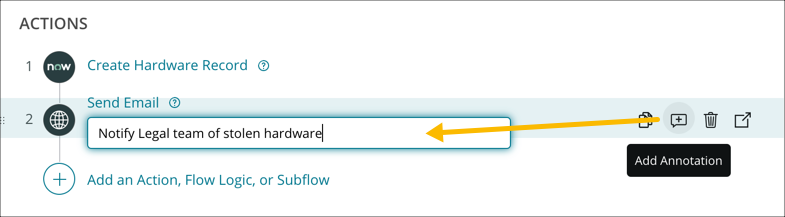
How can the purpose of actions be documented in flow designer?
Use the Add Annotation icon to provide additional details on the purpose of the action. Annotations are useful to identify the purpose of an action.
What is the purpose of error handler and how many actions, flow logic, and subflows can be added?
Identify and correct issues caused by errors in a flow.
- Identify errors in flows as they occur
- run actions and subflows to update records affected by errors in flows
- build action error handling logic
Up to 10 actions, flow logic, and subflows can be added to the Error Handler Section
Define the following Error Handler terms:
Error Handler Switch
Error Status
Code
Message
- Error Handler Switch:
- Enable or disable error handling in a flow.
- Error Status:
- Add details about the error to the flow.
- Code:
- Indicate if the flow returned an error. By default, 1 indicates the flow returned an error and 0 indicates the flow executed successfully. Create an action to define additional error codes.
- Message:
- Add the error message produced by the action, step, or system operation to the flow.
What are the error states reported in the execution details of a flow
- Completed (error caught):
- Generated when a flow identifies an error and executes the actions, flow logic, or subflows in the Error Handler section successfully.
- Completed (error skipped):
- Generated when an action continues running after a step fails.
- Error:
- Generated when an error is not identified.
- An error occurs in a flow while the Error Handler is disabled.
- An error occurs in the Error Handler section.
- Generated when an error is not identified.
What are the three possible states for a test flow execution?
- Completed:
- The flow successfully ran all actions
- Waiting:
- The flow execution paused and is waiting for an action to complete
- Error:
- The flow execution stopped with an error
The _____ _____ section shows what caused the flow to execute: a test or trigger.
The Session Information section shows what caused the flow to execute: a test or trigger.
The _____ _____ section shows how the trigger input variables were configured when the flow executed. _____ _____ vary based on the trigger type:
The Configuration Details section shows how the trigger input variables were configured when the flow executed. Configuration details vary based on the trigger type:
- Record triggers show the table and conditions for a record to trigger the flow.
- Scheduled triggers show the schedule used to trigger the flow.
The _____ _____ section shows the output variables and runtime values from the trigger.
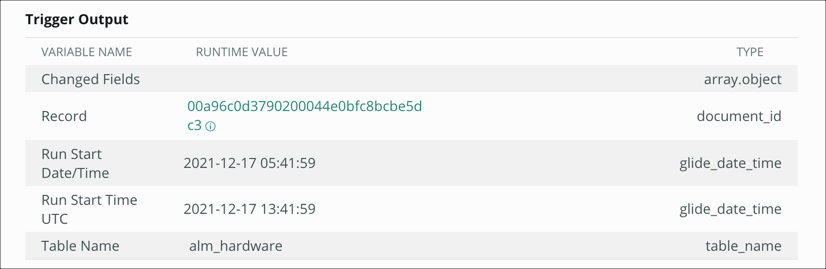
The Trigger Output section shows the output variables and runtime values from the trigger.
In the example, the trigger includes four output variables:
- Changed Fields
- Record
- Run Start Date/Time
- Run Start Time UTC
and Table Name. The runtime value for Table Name in the example is alm_hardware. Runtime values for record and reference variable types are sys_ids.
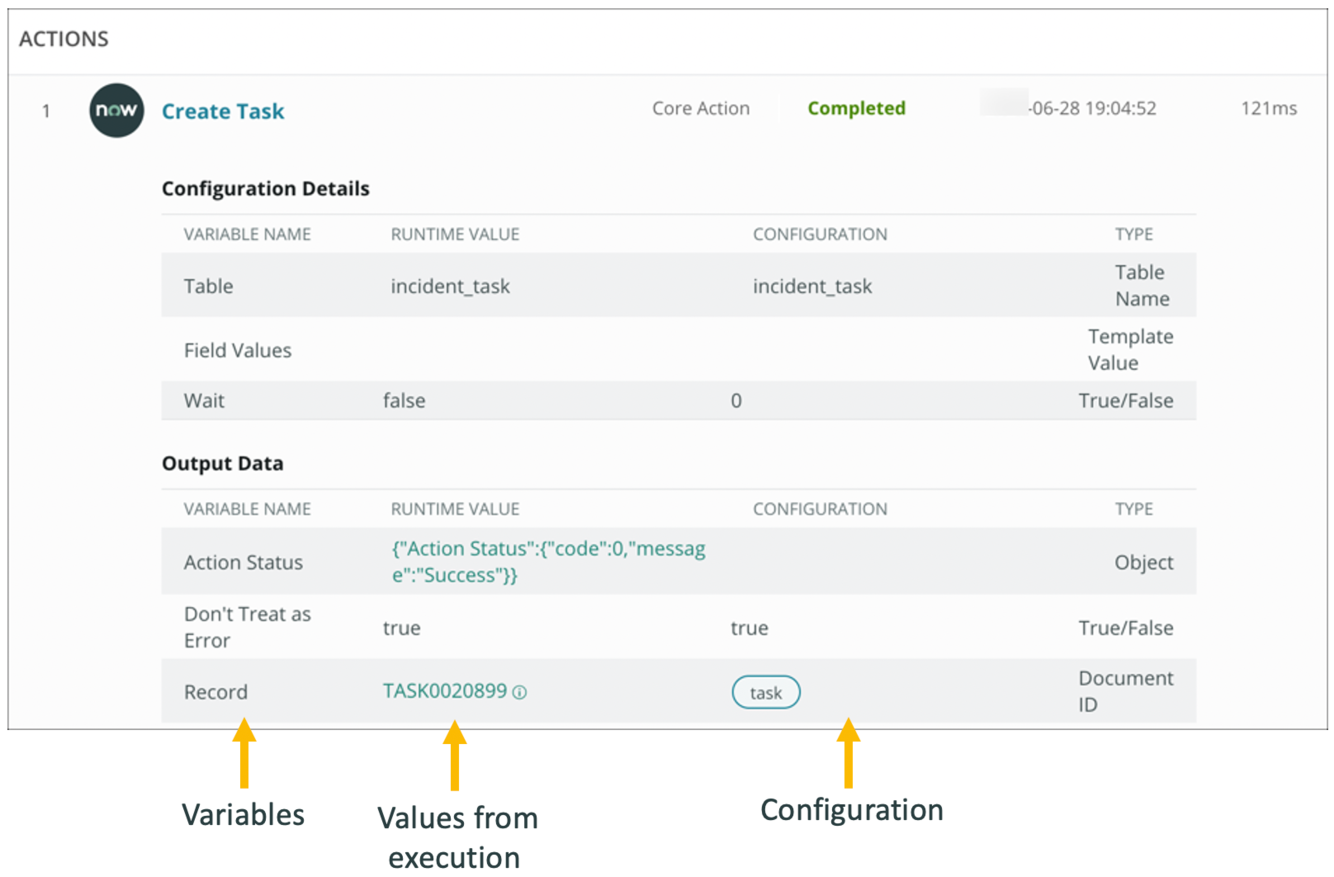
The _____ _____ section shows the action input variables and runtime values when the action executed.
The _____ _____ section shows output variables and runtime values when the action executed. Runtime values for record and reference variable types are links.
The Configuration Details section shows the action input variables and runtime values when the action executed.
The Output Data section shows output variables and runtime values when the action executed. Runtime values for record and reference variable types are links. Click the link to preview details for the referenced record.
Flows can run as two different users. Who are they?
- User who initiates session:
- The flow runs as the user who triggered the flow. For example, if a flow executes when a record is created, the flow runs as the user who created the record.
- System User:
- The flow runs as the System User. The System User is not a user record from the User table. System is a service account that is not restricted by access controls.
NOTE: Flows with an Inbound Email trigger always run as the user who sent the email or the Guest user. The Run As value cannot be set for flows with an Inbound Email trigger.

-
Welcome to ServiceNow56
-
ServiceNow Administration Fundamentals36
-
Barb Valle CSA 1 - Database Administration Practice Test113
-
Barb Valle CSA 2 - Self-Service & Process Automation Practice Test200
-
Barb Valle CSA 3 - Introduction to Development Practice Test33
-
Barb Valle CSA 4 - User Interface & Navigation Practice Test60
-
MN CSA Fundamentals - 1 User Interface & Navigation48
-
MN CSA Fundamentals - 2 Collaboration25
-
MN CSA Fundamentals - 3 Database Administration51
-
MN CSA Fundamentals - 4 Self-Service & Process Automation34
-
MN CSA Fundamentals - 5 Intro to Scripting & Application Tools30
-
MN CSA Fundamentals - 6 Mixed extra questions5
-
ServiceNow Discovery Implementation56
-
Andrew Bowers Exam questions133
-
Andrew Bowers Learning Domain ServiceNow 1 - Engagement Methodology and Project Planning49
-
Andrew Bowers Implementation Cert Quizlet256
-
Andrew Bowers Admin prep deck88
-
Andrew Bowers Implementation from book126
-
Andrew Bowers Implementation from First Test18
-
Andrew Bowers Implementation After attempt17
-
Andrew Bowers Scripting class85
-
Andrew Bowers Customer Service Management9
-
Andrew Bowers Robotic Process Automation (RPA)11
-
Andrew Bowers Vancouver - Scheduled Script Executions and Events35
-
Andrew Bowers Service Desk Call (new call)6
-
Andrew Bowers Vancouver - Server-side Scripting45
-
Andrew Bowers Change Management30
-
01 Andrew Bowers Client-side Scripting27
-
02 Andrew Bowers Debugging Best Practices6
-
03 Andrew Bowers Server-side Scripting73
-
04 Andrew Bowers Outbound REST Integrations4
-
05 Andrew Bowers Other areas15
-
06 Andrew Bowers Securing Applications Against Access from Other Applications14
-
07 Andrew Bowers Flow Designer20
-
01 Andrew Bowers Certification Training100
-
02 Andrew Bowers Certification Training Part 125
-
03 Andrew Bowers Certification Training Part 225
-
04 Andrew Bowers Certification Training Part 325
-
05 Andrew Bowers Certification Training Part 425
-
06 Andrew Bowers Certification additional questions1
-
07 Andrew Bowers Sys Admin test 1-5050
-
08 Andrew Bowers Sys Admin test 51-10050
-
09 Andrew Bowers Sys Admin test 101-15050
-
10 Andrew Bowers Sys Admin test 151-20050
-
11 Andrew Bowers Sys Admin test 201-22424
-
12 Andrew Bowers Application Development Certification39
-
01 Jesse Khon Fundamentals Quiz Questions83
-
03 Jesse Khon Quiz Questions 1,2,3,4,5,6254
-
02 Jesse Khon Module Terms69
-
01 Jesse Khon Fundamentals Quiz Questions COPY83
-
02 Jesse Khon Module Terms COPY69
-
03 Jesse Khon Quiz Questions 1,2,3,4,5,6 COPY254


